
How to Structure SharePoint for Search, Collaboration, and AI Readiness
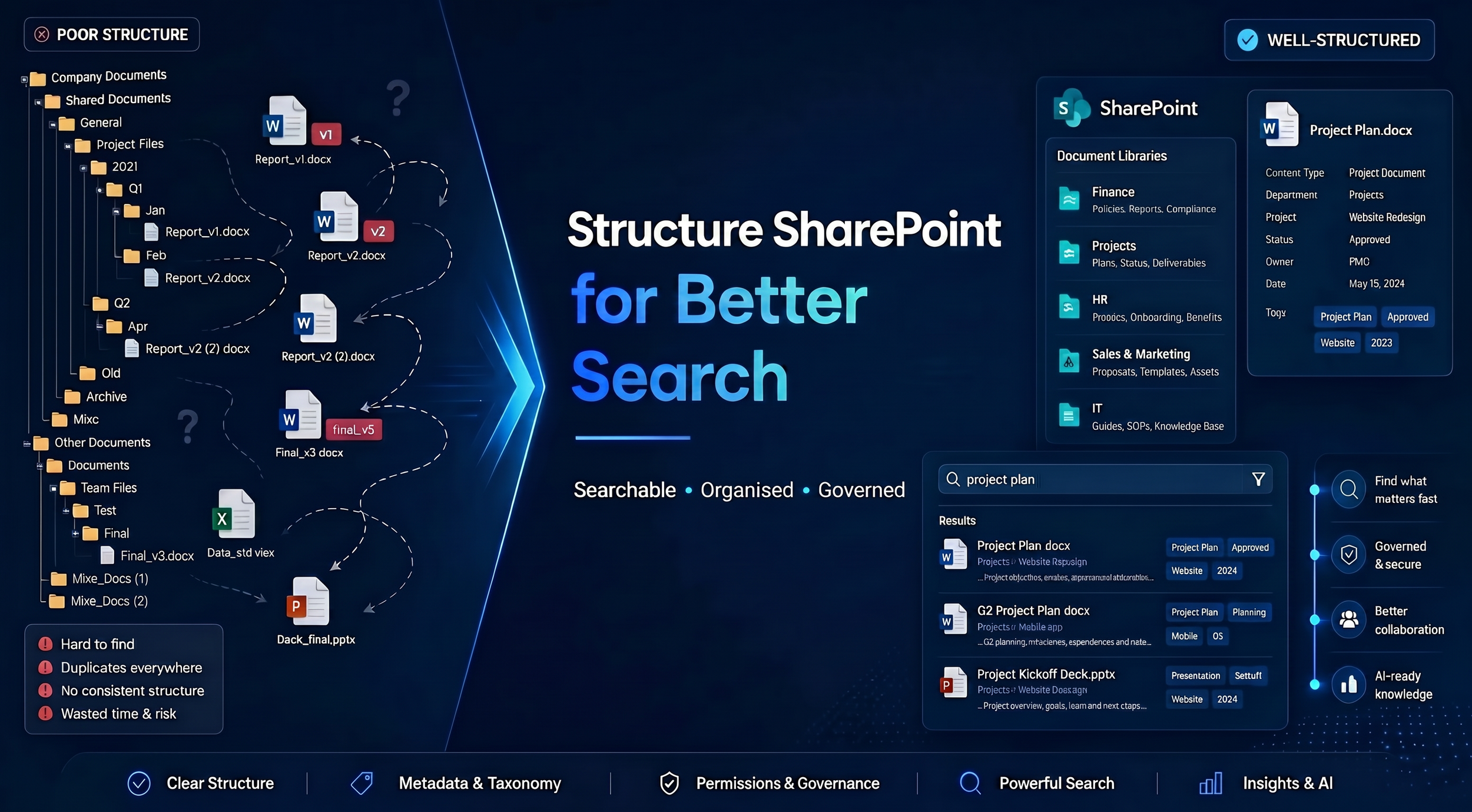
Many SharePoint projects begin with good intentions.
Documents are migrated. Sites are created. Libraries are built. Permissions are assigned.
Yet six months later, employees are still asking:
Where is the latest version?
Which site should I use?
Why can't I find this document?
Do we already have this somewhere?
Which version is correct?
At that point, many organisations conclude that SharePoint isn't working.
But the reality is usually different.
The issue isn't SharePoint.
The issue is structure.
A successful SharePoint environment isn't defined by how much information it stores. It's defined by how easily people can find, trust, share, and use that information.
When SharePoint is structured correctly, it becomes more than a document repository. It becomes a platform for collaboration, governance, knowledge management, and AI readiness.
Why Most SharePoint Implementations Fail
When businesses move to Microsoft 365, they often bring old habits with them.
The technology changes.
The thinking doesn't.
As a result, SharePoint frequently ends up being used like a traditional shared drive rather than a modern information management platform.
The Shared Drive Mentality
Many organisations simply recreate their old file server inside SharePoint.
The familiar folder structure gets copied over:
Operations
 └── Projects
      └── 2026
            └── Client A
                  └── Version 17
The result?
The same problems exist in a new location.
Information becomes difficult to navigate, difficult to search, and difficult to govern.
Folder Obsession
Folders feel intuitive.
They're how many people have organised information for years.
But as the volume of content grows, deep folder structures become increasingly difficult to maintain.
Employees spend more time clicking through folders than finding information.
Lack of Ownership
Without ownership, information quality declines over time.
Documents become outdated.
Permissions become inconsistent.
Duplicate content accumulates.
Poor Governance
Information grows organically without standards.
Different departments create different structures.
Naming conventions vary.
Search becomes less effective.
Technology isn't usually the problem.
Structure is.
The Difference Between Storing Information and Managing Information
One of the most important concepts to understand is the difference between storing information and managing information.
Many businesses successfully store information.
Far fewer successfully manage it.
Storage
Storage simply means:
The document exists.
The file is saved somewhere.
The information can theoretically be found.
That may be enough for compliance or record retention.
But it's rarely enough for productivity.
Information Management
Information management means information is:
Easy to locate
Easy to understand
Easy to trust
Easy to govern
Easy to access
Easy to use
A business with strong information management doesn't rely on employees remembering where documents are stored.
The system helps them find what they need.
This distinction becomes increasingly important as organisations scale and as technologies like Microsoft Copilot rely on trusted, accessible information.
What Good SharePoint Structure Looks Like
A well-structured SharePoint environment is surprisingly simple.
It focuses on four key elements.
Sites
Sites create logical spaces for information.
Examples include:
Human Resources
Operations
Finance
Sales
Projects
Policies and Procedures
Sites should reflect how the business operates.
Not how the server was historically organised.
Document Libraries
Libraries organise related content within a site.
For example:
HR Site
Employee Records Library
Policies Library
Training Library
Operations Site
Project Documents Library
Procedures Library
Reports Library
Libraries create structure without unnecessary complexity.
Metadata
Metadata describes information.
Examples include:
Department
Client
Project
Status
Document Type
Review Date
Metadata helps transform SharePoint from a storage platform into a searchable knowledge platform.
Ownership
Every site and library should have clear ownership.
Ownership ensures:
Documents remain current
Permissions remain appropriate
Governance standards are maintained
Without ownership, even the best structure eventually degrades.
Design SharePoint Around the Way Your Business Works
One of the biggest mistakes organisations make is designing SharePoint around folder structures.
Instead, design SharePoint around how work happens.
Departments
Departments often require dedicated content areas.
Examples:
Finance
Human Resources
Operations
Sales
Marketing
This creates clear ownership and accountability.
Projects
Projects generate temporary collaboration needs.
Dedicated project spaces help teams:
Share files
Collaborate effectively
Manage documentation
without affecting broader organisational structures.
Business Functions
Some information supports processes rather than departments.
Examples include:
Procurement
Quality Management
Risk Management
Compliance
These often deserve their own structured information environment.
Knowledge Areas
Many businesses overlook organisational knowledge.
Examples include:
Policies
Procedures
Standards
Training materials
Templates
These resources should be managed as long-term business assets.
The goal is to structure SharePoint around how employees work—not around how folders were historically organised.
Why Metadata Matters More Than Folders
This is where many SharePoint environments either succeed or fail.
Most organisations think folder organisation is the solution.
In reality, folders often become the problem.
The Limitation of Folders
Folders organise information by location.
To find a document, users often need to know exactly where it was stored.
If they don't know the path, they're forced to browse.
As environments grow, folder structures become increasingly complex.
The Power of Metadata
Metadata organises information by meaning.
Instead of asking:
Where was this document stored?
employees can ask:
Show me all project reports for Client A.
or
Show all approved procedures.
or
Show all documents due for review this month.
Metadata supports:
Filtering
Search
Governance
Reporting
Automation
More importantly, it improves discoverability.
Simple Metadata Examples
A procedure document might include:
Department: Operations
Document Type: Procedure
Status: Approved
Owner: Operations Manager
Review Date: July 2027
Suddenly, SharePoint can organise, sort, and surface information dynamically rather than relying on static folders.
Building SharePoint for Search
Most employees search before they browse.
This means SharePoint should be designed with search in mind from the beginning.
Searchability Starts With Structure
Good search results require:
Consistent naming
Metadata
Clear ownership
Logical site structures
Poorly structured environments create poor search experiences.
Make Information Discoverable
Ask:
Can employees find information without knowing exactly where it lives?
Can employees filter search results effectively?
Are duplicate documents appearing in searches?
If the answer is no, the structure needs work.
Good SharePoint environments help users discover information—not hunt for it.
How SharePoint Supports Collaboration
A well-designed SharePoint environment improves collaboration as much as information management.
Version Control
Version control reduces confusion.
Employees know they're working from the current version rather than manually saving:
Final.docx
Final_v2.docx
Final_v3.docx
Final_FINAL.docx
Shared Ownership
Information becomes a business asset rather than an individual's responsibility.
Knowledge remains accessible when employees:
Change roles
Move teams
Leave the organisation
Better Team Collaboration
Teams can confidently collaborate using trusted information.
Everyone works from the same source of truth.
How SharePoint Supports Collaboration
A well-designed SharePoint environment improves collaboration as much as information management.
Version Control
Version control reduces confusion.
Employees know they're working from the current version rather than manually saving:
Final.docx
Final_v2.docx
Final_v3.docx
Final_FINAL.docx
Shared Ownership
Information becomes a business asset rather than an individual's responsibility.
Knowledge remains accessible when employees:
Change roles
Move teams
Leave the organisation
Better Team Collaboration
Teams can confidently collaborate using trusted information.
Everyone works from the same source of truth.
How SharePoint Structure Supports AI Readiness
As organisations begin exploring Microsoft Copilot and AI adoption, SharePoint structure becomes even more important.
Many businesses assume AI will solve information problems.
In reality, AI often exposes them.
AI Relies on Information
AI can only work with information it can access.
If content is:
duplicated
outdated
poorly organised
difficult to find
AI results become less reliable.
SharePoint Creates Context
Structured SharePoint environments provide:
Better search experiences
Better content discovery
Better information governance
More trusted information
This creates a stronger foundation for AI readiness and supports future AI initiatives.
AI Doesn't Create Structure
AI doesn't organise information for you.
It depends on information being organised already.
That's why strong SharePoint structure is increasingly becoming an essential part of preparing for AI adoption.
Common SharePoint Mistakes to Avoid
Rebuilding Shared Drives
Don't recreate old file servers inside SharePoint.
Creating Too Many Folders
Folders should support information management, not replace it.
Ignoring Metadata
Metadata significantly improves search and discoverability.
Failing to Assign Ownership
Unowned information becomes unmanaged information.
Ignoring Data Governance
Even well-designed SharePoint environments require ongoing data governance to remain effective.
Creating Sites for Everything
Not every initiative requires a separate SharePoint site.
Keep structures purposeful and manageable.
Final Thoughts
Most businesses don't have a SharePoint problem.
They have an information structure problem.
When SharePoint is designed around search, governance, collaboration, and business processes, it becomes far more than a document storage platform.
It becomes a foundation for:
Better information management
Stronger collaboration
Improved business productivity
Simplified governance
AI readiness
A successful SharePoint environment isn't measured by how much content it stores.
It's measured by how easily people can find, trust, and use that content.
Because ultimately, information only creates value when people can access it.