
Automation has become one of the most talked-about opportunities in business.
Whether it's Microsoft Power Automate, workflow automation, AI agents, or Microsoft Copilot, organisations are under increasing pressure to do more with less. The promise is compelling: reduce manual work, eliminate repetitive tasks, improve efficiency, and free employees to focus on higher-value activities.
But there's a problem.
Many businesses start with the wrong question.
They ask:
What can we automate?
When they should be asking:
What should we automate first?
The difference matters.
Not every process is worth automating. Some processes need to be improved first. Others should be simplified. Some should be eliminated entirely.
The organisations that see the greatest success from automation don't automate everything. They automate the right things.
The key is knowing where to start.
Why Automating Everything Is the Wrong Goal
When businesses first explore automation, it's easy to become excited about the possibilities.
Teams identify dozens of manual tasks and immediately start imagining how technology could remove them.
However, automation isn't a goal.
Improvement is.
Automating a poor process rarely solves the underlying issue. In many cases, it simply helps the business perform inefficient activities faster.
Consider a process that requires five approvals for a simple request.
An automation platform can certainly automate those approvals.
But if only one approval is actually necessary, the process still remains inefficient.
The organisation has automated waste.
That's why successful automation initiatives focus on value, not volume.
The goal isn't to automate everything.
The goal is to automate the activities that create the most benefit while reducing unnecessary effort.
Start With Process Visibility
Before deciding what to automate, businesses need a clear understanding of how work currently happens.
Many organisations struggle because nobody can fully explain how a process works from beginning to end.
Activities evolve over time.
Workarounds are introduced.
Exceptions become standard practice.
Different teams develop different ways of working.
This is why business process mapping should happen before automation decisions are made.
Process mapping helps organisations understand:
Where work starts
Where work ends
Who is involved
What systems are used
Where delays occur
Which activities create value
Without this visibility, automation decisions are often based on assumptions rather than evidence.
If you haven't already documented your workflows, start with business process mapping before evaluating automation opportunities.
What Makes a Process a Good Automation Candidate?
Not every process deserves automation.
The best automation candidates share several common characteristics.
Repetitive
The activity happens frequently and follows a predictable pattern.
Examples include:
Sending notifications
Processing requests
Updating records
Moving information between systems
The more frequently a task occurs, the greater the potential return from automation.
Rule-Based
Automation performs best when decisions follow clear logic.
Examples:
If approved, move to the next stage
If overdue, send a reminder
If form completed, create a record
The more structured the decision-making process, the easier the automation.
High Volume
Processes performed multiple times every day typically provide stronger automation opportunities than activities performed once every few months.
High volume creates greater potential for:
Time savings
Consistency
Efficiency improvements
Stable
A process should be relatively consistent before it is automated.
If employees regularly change the process or if the workflow is still evolving, automation can create unnecessary complexity.
Stability should come first.
Automation should come second.
Low Judgement Requirements
The best automation candidates rely on rules rather than human interpretation.
Examples:
Data transfer
Notifications
Routing requests
Processing approvals
Complex judgement activities often require human involvement even after automation is introduced.
The Best Business Processes to Automate First
Many automation success stories start with a handful of practical workflows.
These processes typically deliver quick wins while introducing minimal risk.
Approval Workflows
Approval processes are among the most common automation opportunities.
Examples include:
Leave requests
Purchase approvals
Expense approvals
Document reviews
Manual approvals often create delays because requests sit in inboxes waiting for action.
Automation can:
Route requests automatically
Send reminders
Escalate overdue approvals
Provide visibility into status
Notifications and Reminders
Many employees spend time sending messages that follow a predictable pattern.
Examples include:
Follow-up reminders
Due date notifications
Compliance alerts
Status updates
These activities rarely require human judgement and are often ideal automation candidates.
Data Entry and Data Transfers
One of the most common productivity challenges is moving information between systems.
Examples:
Form submissions into SharePoint
Spreadsheet updates
CRM updates
Customer record creation
Data transfer activities are repetitive, structured, and often error-prone when handled manually.
Automation can improve both speed and accuracy.
Document Routing
Many organisations rely heavily on documents moving between departments.
Examples:
Contract reviews
Policy approvals
Invoice processing
Quality assurance reviews
Automation can ensure documents reach the right people without manual intervention.
Recurring Reporting
Teams often spend hours producing recurring reports.
Examples:
Weekly operational reports
Monthly management updates
Project status summaries
KPI dashboards
Automating report generation can save significant administrative effort while improving consistency.
Employee Onboarding
Onboarding typically involves a series of highly repeatable activities.
Examples:
Account setup requests
Equipment allocation
Training assignments
Policy acknowledgements
Automation helps ensure onboarding steps are completed consistently and on time.
What You Should Not Automate Yet
Understanding what not to automate is just as important as understanding what to automate.
Broken Processes
If a process frequently fails, automation is unlikely to solve the underlying problem.
Fix the process first.
Then automate it.
Low-Volume Activities
Some tasks simply do not occur often enough to justify automation.
If an activity happens a few times each year, the implementation effort may outweigh the benefits.
Judgement-Heavy Work
Processes that depend heavily on experience, context, or nuanced decision-making often require human involvement.
Examples:
Performance reviews
Strategic planning
Complex customer escalations
Business negotiations
Automation may support these processes, but it should not replace critical human judgement.
Processes Undergoing Change
If the workflow is actively being redesigned, wait until the new process stabilises.
Automating a moving target often creates unnecessary rework.
Poorly Governed Processes
Processes with unclear ownership, inconsistent data, or weak controls should be reviewed before automation.
Strong data governance creates the foundation for effective automation by ensuring accountability, consistency, and reliability.
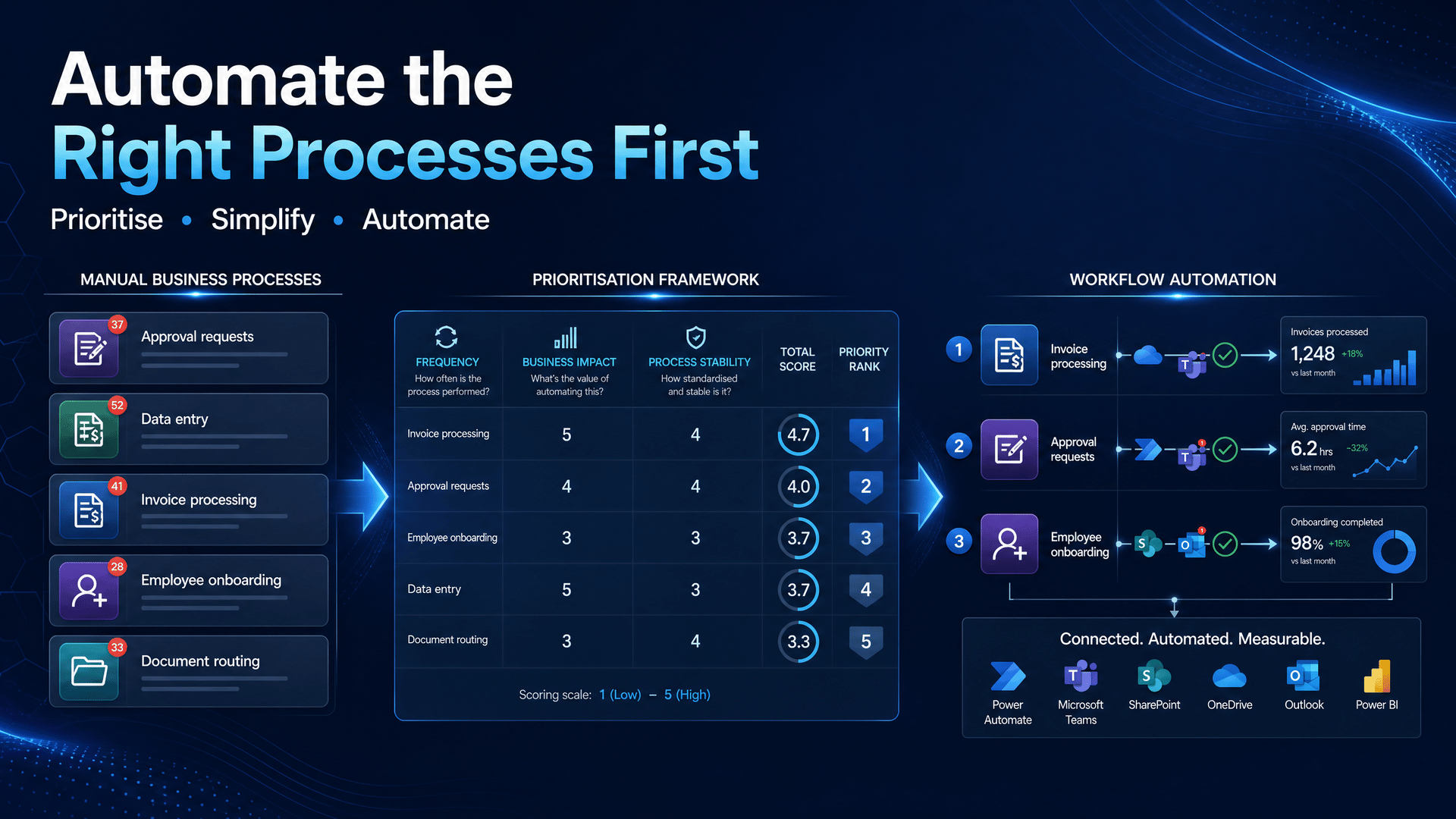
How to Prioritise Automation Opportunities
One of the biggest challenges businesses face is deciding where to begin.
Rather than relying on assumptions, create a simple prioritisation framework.
Score each process against the following criteria.
Frequency
How often does the process occur?
Higher frequency generally increases automation value.
Time Savings
How much manual effort could be reduced?
Processes that consume significant employee time often deliver stronger returns.
Error Risk
How often do mistakes occur?
Automation can help reduce errors caused by repetitive manual work.
Process Stability
Is the workflow well understood and consistent?
Stable processes are usually better automation candidates.
Business Impact
Does improving this process create meaningful business value?
Focus on high-impact activities before low-impact tasks.
Data Readiness
Does the process rely on accessible, reliable information?
A single source of truth helps improve automation outcomes by ensuring information is accurate, consistent, and available when needed.
Processes that score highly across these categories are usually strong candidates for automation.
Where Microsoft 365 and Power Automate Fit
Many businesses already possess strong automation opportunities within Microsoft 365.
Processes frequently involve:
Outlook
Teams
SharePoint
Microsoft Forms
Excel
Planner
Because these systems already contain business information and workflows, they often provide ideal starting points for automation initiatives.
Examples include:
Routing Forms submissions into SharePoint
Creating Teams notifications when documents are approved
Triggering Outlook reminders for overdue tasks
Updating records across systems
These scenarios can often be implemented through Power Automate consulting and workflow optimisation initiatives.
The key is selecting the right process before selecting the technology.
Final Thoughts
The best automation projects don't begin with technology.
They begin with understanding.
Before investing in workflow automation, businesses should ask:
Is the process clearly defined?
Is the process stable?
Does it create measurable value?
Are the inputs reliable?
Is the process worth automating?
The most successful organisations don't automate everything.
They prioritise.
They focus on visible, repeatable, high-impact processes that create meaningful business outcomes.
Because automation is not about replacing people.
It's about removing unnecessary effort so people can focus on the work that matters most.
And that starts by automating the right processes first.