
Why Offsite Cloud Backup Is Essential for Business Continuity

Data drives every decision, transaction, and interaction in a business. For small and medium-sized enterprises (SMEs), losing critical information isn’t just inconvenient—it can halt operations, damage customer trust, and lead to significant financial loss. Many organisations rely on onsite backups, assuming that storing files locally is enough to keep their data safe.
Yet, cyberattacks, hardware failures, natural disasters, and simple human errors can make local backups ineffective. Offsite cloud backup addresses these risks by storing secure copies of your data in a remote location. This ensures your business can recover quickly from disruptions, continue operations, and maintain resilience in the face of unexpected events.
This guide explains why offsite cloud backup is essential for business continuity, explores the risks it mitigates, highlights its benefits, and outlines how SMEs can implement a robust and reliable backup strategy.
What Is Offsite Cloud Backup?
Offsite cloud backup refers to storing copies of your business data on a remote cloud server, physically separate from your primary systems. Unlike traditional onsite backups—such as external hard drives or local servers—offsite backups provide geographic redundancy, protecting your business from local disasters, theft, or equipment failure.
Modern offsite cloud backup solutions often include:
Automated backup schedules to ensure your data is consistently protected
End-to-end encryption to safeguard sensitive information
Granular recovery options, allowing restoration of individual files, folders, or systems
Compliance management to meet regulatory standards and industry requirements
For SMEs, this means reduced manual effort, less risk, and faster recovery in the event of a disaster.
Why Offsite Backup Is Crucial for Business Continuity
Business continuity is the ability of an organisation to maintain operations during disruptive events. Without proper offsite backups, even minor incidents can escalate into major crises. Consider the following scenarios:
Ransomware attacks: Local systems may be encrypted, leaving onsite backups compromised.
Hardware failures: A server crash can make data inaccessible, halting operations.
Natural disasters: Fires, floods, or storms can destroy physical storage.
Human error: Employees may accidentally delete or overwrite critical files.
Offsite cloud backups provide a secure, separate copy of your data, allowing you to restore essential systems quickly and minimise operational disruption.
Key Risks Mitigated by Offsite Cloud Backup
Implementing offsite cloud backup protects SMEs from a variety of risks:
Cyberattacks and ransomware: Independent copies of data remain safe even if local systems are compromised.
Hardware failures: Servers and storage devices can fail unexpectedly; offsite backups ensure your data is recoverable.
Natural disasters: Fires, floods, or power outages won’t affect remote cloud storage.
Human error: Accidental deletions or misconfigurations can be quickly undone by restoring previous versions.
Theft or physical damage: Laptops or servers stolen from your premises don’t compromise your offsite backup.
Corrupted files or software bugs: Many cloud solutions offer versioning, letting you recover uncorrupted copies of files.
Fact: Research indicates that 60% of SMEs experiencing significant data loss shut down within six months. Offsite cloud backup can be the difference between continuity and closure.
Benefits of Offsite Cloud Backup for SMEs
Adopting offsite cloud backup delivers several tangible advantages:
24/7 Data Accessibility: Securely access files from any location, supporting hybrid work or remote teams.
Automated Backup Schedules: Consistently protect data without relying on manual processes.
Enhanced Security: Encryption and authentication safeguard sensitive business information.
Faster Recovery Times: Minimise downtime, maintaining productivity during incidents.
Cost-Effective Redundancy: Avoid the expense of duplicating onsite infrastructure.
Compliance and Audit Readiness: Many cloud providers help businesses meet GDPR, ISO, and other regulatory standards.
Scalable Storage: Cloud backups expand with your business without the need for additional hardware.
Peace of Mind: Knowing that data is secure allows business leaders to focus on growth and innovation.
Example: A Sydney-based SME faced a ransomware attack that encrypted all onsite files. Thanks to an offsite cloud backup solution, they restored their data within hours, avoiding weeks of downtime and potential revenue loss.
Offsite vs. Onsite Backup: Understanding the Differences
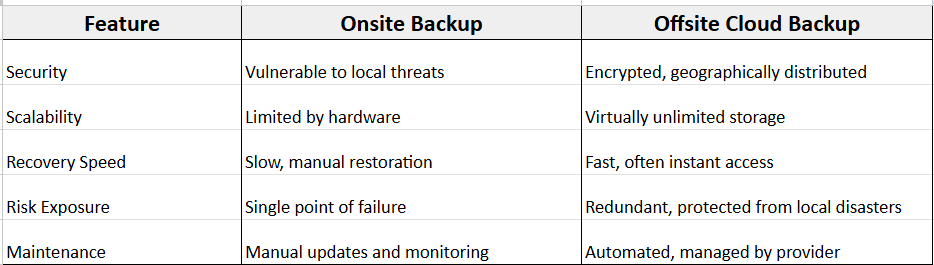
Best practice: Combining onsite and offsite backups ensures both quick local access and secure, resilient storage in the cloud.
Strengthening Disaster Recovery with Offsite Backup
Offsite cloud backup is a cornerstone of disaster recovery planning. Key advantages include:
Reduced downtime: Quickly restore essential files and systems.
Remote operations: Employees can continue working from any location.
Predictable recovery times: Define Recovery Time Objectives (RTOs) and meet them reliably.
Customer trust: Swift recovery prevents service interruptions and protects your brand reputation.
Pro Tip: Regularly test your recovery process to ensure backups are complete and functional. Testing can uncover gaps before an actual disaster strikes, saving valuable time and money.
Choosing a Reliable Offsite Cloud Backup Solution
When selecting a provider, consider:
Encryption standards: Protect data both in transit and at rest.
Redundancy: Multi-site storage ensures availability even if one server fails.
Automated scheduling and monitoring: Reduces the risk of human error.
Granular recovery: Restore individual files or entire systems quickly.
Compliance support: Meet legal and industry standards effortlessly.
24/7 support and reliability: Access assistance whenever needed.
Choosing the right provider ensures that your offsite backup strategy is resilient, secure, and scalable, giving your business long-term protection.
Why SMEs Should Not Rely on Onsite Backup Alone
While onsite backups remain important, they are insufficient on their own:
Single point of failure: Vulnerable to fire, theft, or hardware failure.
Limited scalability: Expanding storage requires costly hardware upgrades.
Slower recovery: Manual restoration can be time-consuming.
Maintenance burden: IT teams must monitor and update local systems constantly.
Insight: Using offsite cloud backups alongside onsite backups creates a hybrid strategy that offers speed, security, and resilience, covering all potential vulnerabilities.
How Ezynode Supports Business Continuity
Ezynode provides SMEs with secure, managed offsite cloud backup solutions tailored for business continuity:
Automated offsite backups for all critical business data
Rapid disaster recovery and restoration options
End-to-end encryption and compliance support
Scalable solutions to match your business growth
Local support and monitoring to ensure uptime
With Ezynode handling backup management, your team can focus on operations and growth, knowing your data is safe, secure, and recoverable.
Protect Your Business with Offsite Cloud Backup
Offsite cloud backup is essential for business continuity, risk mitigation, and operational resilience. SMEs that adopt a robust offsite backup strategy protect themselves against cyberattacks, system failures, natural disasters, and human error. This ensures that critical operations continue uninterrupted, downtime is minimized, and sensitive data remains secure.
Protect your data. Protect your business. Partner with Ezynode today to implement a reliable offsite cloud backup strategy and secure your business continuity.